Seite 1 von 1
Not Working :( ?
Verfasst: So 26. Jul 2020, 04:03
von tizdaz
Hi guys,
Trying to setup my new RC-2 module, I had a little problem with the power but thats ok now & the Green LED is on, but i cant get any sound to come through speaker?
ive enable engine start on engine sound auto when motion detected as i dont have a switch but that isnt helping.
Ive double checked all wiring but nothing?
I also have the K USB2 Data Cable that i bought but when i connect this nothing seems to happen when i click on diagnose via data cable?
Re: Not Working :( ?
Verfasst: So 26. Jul 2020, 11:42
von Rascal
Hi,
please upload the project file (*.usm) for us to check first.
Re: Not Working :( ?
Verfasst: So 26. Jul 2020, 15:54
von tizdaz
Hi Rascal thanks for reply!
I managed to get it working, it seems the power distribution board im using wasnt giving enough power,but fixed that and now its got sound!
But now i have another issue! The sound is working great when i move the throttle stick on my tx the sound matches it etc which is great, but when my throttle tx is Idle the sound continues of running engine instead of idle sound, on my computer the idle sound works but when i try it on my model the idle sound isnt triggering when my throttle tx stick in neutral, any ideas

? Is there a setting i need to change anywhere so the idle sound triggers when my tx throttle stick is neutral position?
Thanks!
Re: Not Working :( ?
Verfasst: So 26. Jul 2020, 18:09
von Rascal
Hi,
you can try to increase the value for Zero point deadband under Configuration > Engine sound > Engine sound.
If there is no success please state what ESC (make and model) you are using and upload the project file (*.usm).
Re: Not Working :( ?
Verfasst: So 26. Jul 2020, 20:27
von tizdaz
Rascal hat geschrieben: ↑So 26. Jul 2020, 18:09
Hi,
you can try to increase the value for
Zero point deadband under
Configuration > Engine sound > Engine sound.
If there is no success please state what ESC (make and model) you are using and upload the project file (*.usm).
Brilliant worked a treat

The next thing I want to add is a trigger for a sound file (bell) I want it to work so when I move my Left control stick to the left it will play the bell sound once, My TX is this:
https://www.flysky-cn.com/fsi6s
How would I do this please
?
Also, I read that volume can also be adjusted from the TX, how would I set it up so when I move my Right Stick on my TX (Up & Down) it will adjust volume?
Thanks again for your help
Re: Not Working :( ?
Verfasst: So 26. Jul 2020, 21:15
von Rascal
Hi,
tizdaz hat geschrieben: ↑So 26. Jul 2020, 20:27
The next thing I want to add is a trigger for a sound file (bell) I want it to work so when I move my Left control stick to the left it will play the bell sound once, My TX is this:
https://www.flysky-cn.com/fsi6s
How would I do this please
?
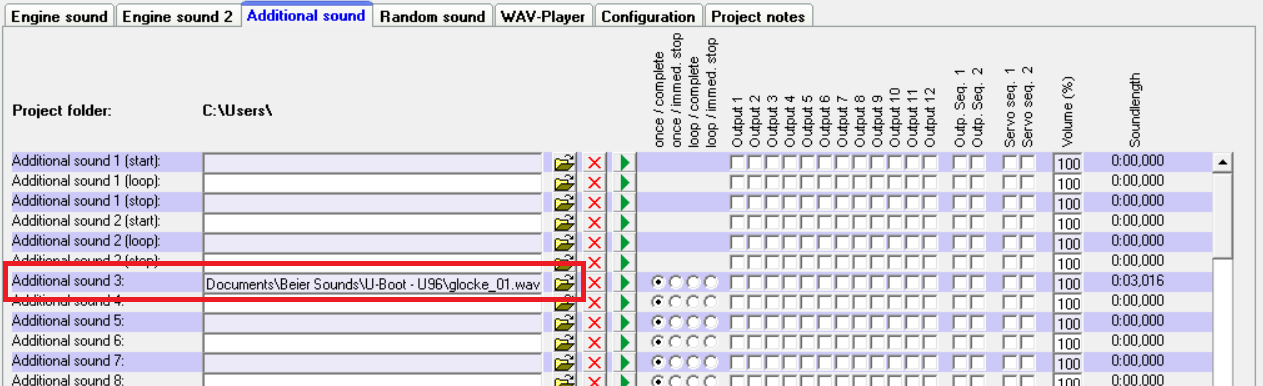
Assign the sound file for the bell sound to an
Additional Sound slot, e.g. "Additional sound 3".
- sound1.png (126.66 KiB) 2910 mal betrachtet
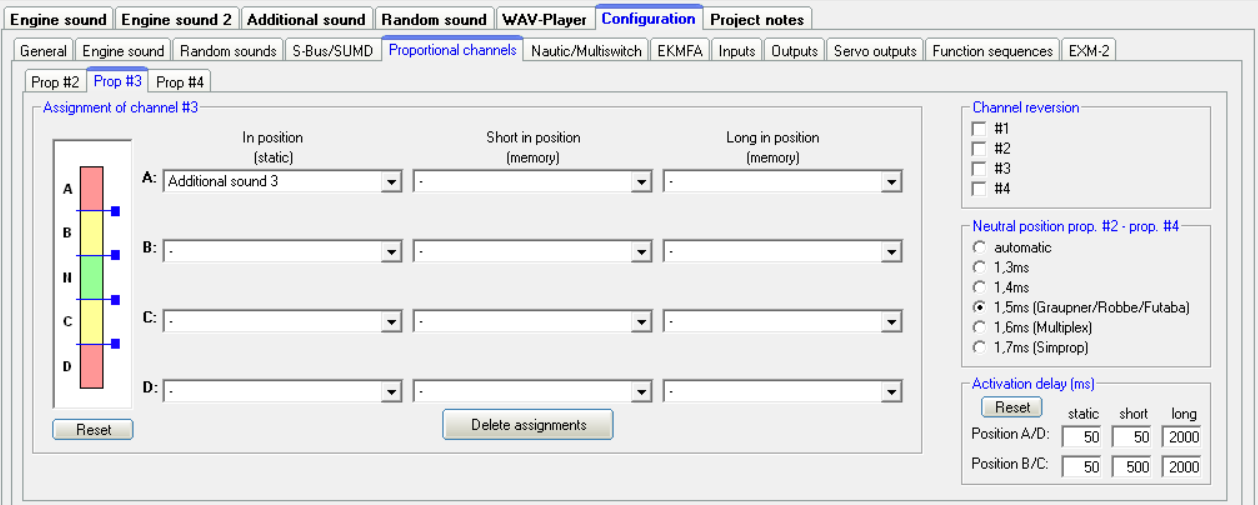
Assuming your left stick left/right is channel 3 on you receiver *:
- Connect Channel 3 of your receiver with USM X2/3 (Prop #3)
- Go to
Configuration > Proportional Channels > Prop #3
- Assign the function "Additional Sound 3" to area A "In Position (static)"
If the bell sound is triggered by moving the stick to the right instead of left move the function to area D instead.
- sound2.png (78.64 KiB) 2910 mal betrachtet
Also, I read that volume can also be adjusted from the TX, how would I set it up so when I move my Right Stick on my TX (Up & Down) it will adjust volume?
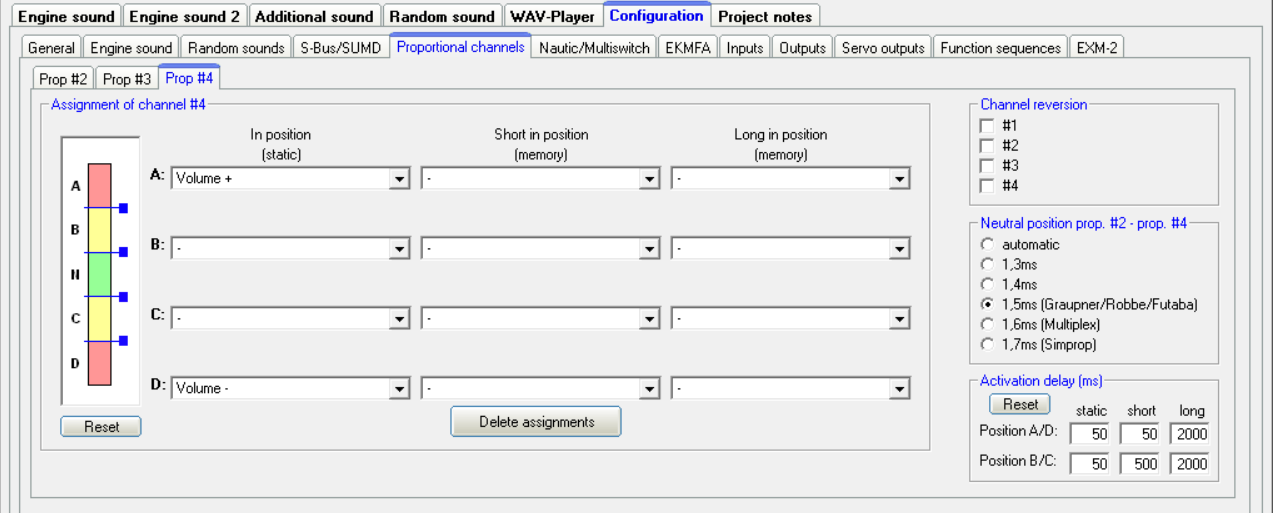
Assuming your right stick up/down is channel 2 on you receiver *:
- Connect Channel 2 of your receiver with USM X2/4 (Prop #4)
- Go to
Configuration > Proportional Channels > Prop #4
- Assign the function "Volume +" to area A "In Position (static)"
- Assign the function "Volume -" to area D "In Position (static)"
If the volume is decreased instead of increased by moving the stick up swap the functions in area A and D.
- sound3.png (78.85 KiB) 2910 mal betrachtet
* Depends on the mode setting of your TX, please check from the manual or use a servo to find the correct channel for the respective stick on your RX
 ? Is there a setting i need to change anywhere so the idle sound triggers when my tx throttle stick is neutral position?