Seite 1 von 1
Wie kann ich ein Projekt von der SD-Karte auf meinen PC importieren?
Verfasst: Di 14. Jan 2020, 16:04
von BEIER-Electronic Evelyn
Projekt von SD-Karte auf den PC importieren
Computer defekt und keine Sicherheitskopie des Projektes vorhanden?
Kein Problem! Hier ist eine Anleitung, wie die Soundprojekt-Daten von der SD-Karte auf einen PC übertragen werden können.
Das Importieren eines Projektes von der SD-Karte funktioniert bei allen BEIER-Modulen mit einer neueren Sound-Teacher Version gleich.
Wurde das Projekt bei einem USM-RC-2 vor 2013 auf die SD-Karte gespeichert, ist die Importfunktion leider nicht möglich.
Zu Beginn wird der Sound-Teacher gestartet und die SD-Karte in den Kartenleser am PC eingesteckt. Sollte die SD-Karte nicht automatisch vom Sound-Teacher erkannt werden, muss zunächst im Sound-Teacher Menu „SD-Karte“ das richtige Laufwerk ausgewählt werden.
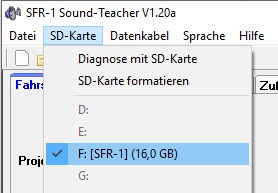
- SD-Karte.jpg (37.92 KiB) 15339 mal betrachtet
Unter dem Menü „Datei“ kann nun die Aktion „Projekt von SD-Karte importieren“ ausgewählt werden.

- Datei.jpg (42.07 KiB) 15339 mal betrachtet
Im Dialogfeld „Speichern unter“ muss jetzt das Laufwerk und der Ordner ausgewählt werden, in dem die einzelnen Soundprojekt-Dateien gespeichert werden sollen. Hierfür kann optional ein neuer Projektordner erstellt werden, da die Sounds und Projektdaten einzeln übertragen werden.
Im Feld "Dateiname" muss nun ein Name für die importierte Projektdatei vergeben werden.
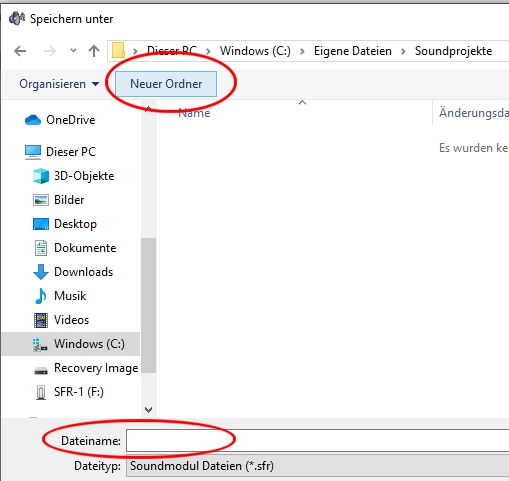
- Dateiname.jpg (75.93 KiB) 15339 mal betrachtet
Abschließend klickt man auf "Speichern" und das Projekt wird von der SD-Karte auf den PC importiert. Das importierte Projekt wird anschließend automatisch im Sound-Teacher geöffnet.
Re: Wie kann ich ein Projekt von der SD-Karte auf meinen PC importieren?
Verfasst: Mo 6. Jul 2026, 20:56
von Reinirot
Vielen Dank.

Re: Wie kann ich ein Projekt von der SD-Karte auf meinen PC importieren?
Verfasst: Mo 31. Aug 2026, 13:58
von Cor
Good afternoon,
I have the same question, and thought I had found the solution here, but unfortunately, it does not work out for me.
I have the most recent sound Teacher installed, and have the original SD card; this card still works, as I made a copy on my harddrive for security reasons (which I did NOT use in this instance.) It also works in my truck.
So I opened the Sound Teacher and inserted the SD card in my pc. This then opened in what I assume is the right file, as you can hopefully see on my screendump.
I went to the file section and clicked on the section: "import file from the SD card", then received an error message, to tell me that this cannot be opened.."Import of the project from the SD card is not possible"....
What now/what went wrong? What can I do about this? For now, I am stuck, have tried the same thig several times.
Thanks for your assistance.
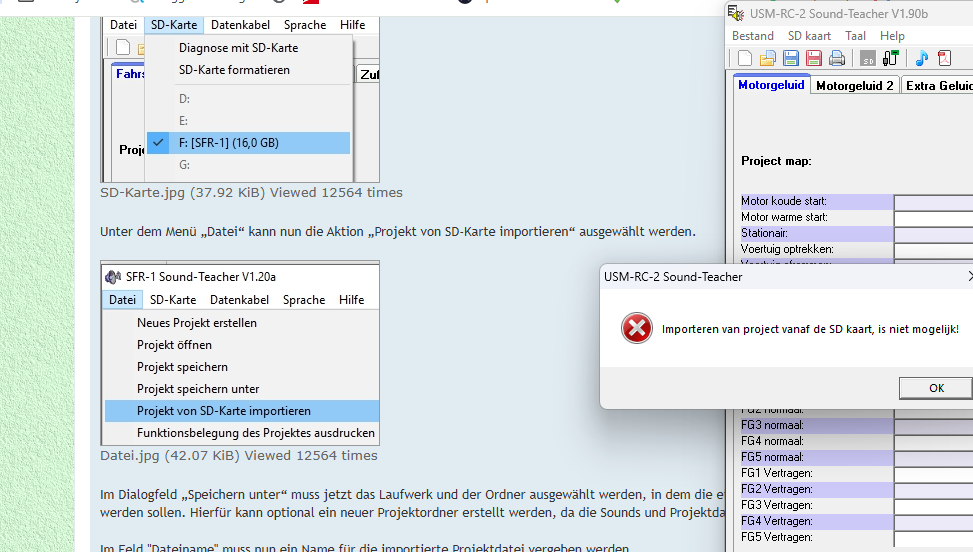
- Screenshot 2026-08-31 134209.png (206.73 KiB) 2934 mal betrachtet
Re: Wie kann ich ein Projekt von der SD-Karte auf meinen PC importieren?
Verfasst: Mo 31. Aug 2026, 14:54
von BEIER-Electronic Andy
Please send me the complete contents of the SD card via email (
modellbau@beier-electronic.de). Then I can see exactly where the problem lies.
Re: Wie kann ich ein Projekt von der SD-Karte auf meinen PC importieren?
Verfasst: Mo 31. Aug 2026, 14:55
von Rascal
Hello Cor,
I see screenshots of the SFR-1 and USM-RC-2 Sound-Teachers and it seems on the left you are trying to import the configuration file from the SD card using the SFR-1 ST but the error message is from the USM-RC-2 ST.
Please close the USM-RC-2 Sound-Teacher since the SD card is labelled SFR-1, so I assume it contains a project for the SFR-1 and not the USM-RC-2.
Re: Wie kann ich ein Projekt von der SD-Karte auf meinen PC importieren?
Verfasst: Mo 31. Aug 2026, 15:34
von Cor
I guess there is a bit of confusion here now, because I was trying to find a way to open the SD card, and thought that THIS topic showed me the way how to. So the left part of the screendump is post #1 of this topic, in the background op the screendump which told me how to.
I had however opened the USM-RC-2 version V1-90b, as you see on the top right.
The SD card contains data from 2017 and before, so I concluded, together with the pictures on your site, that my Sound system is indeed the USM-RC-2
Where do you see that this SD card is labelled SFR-1 ??
I enclose a reent photograph of MY Sound system
Sorry for the confusion, I hope that I understood you correctly, or are you saying that I use the incorrect software to open tis card?
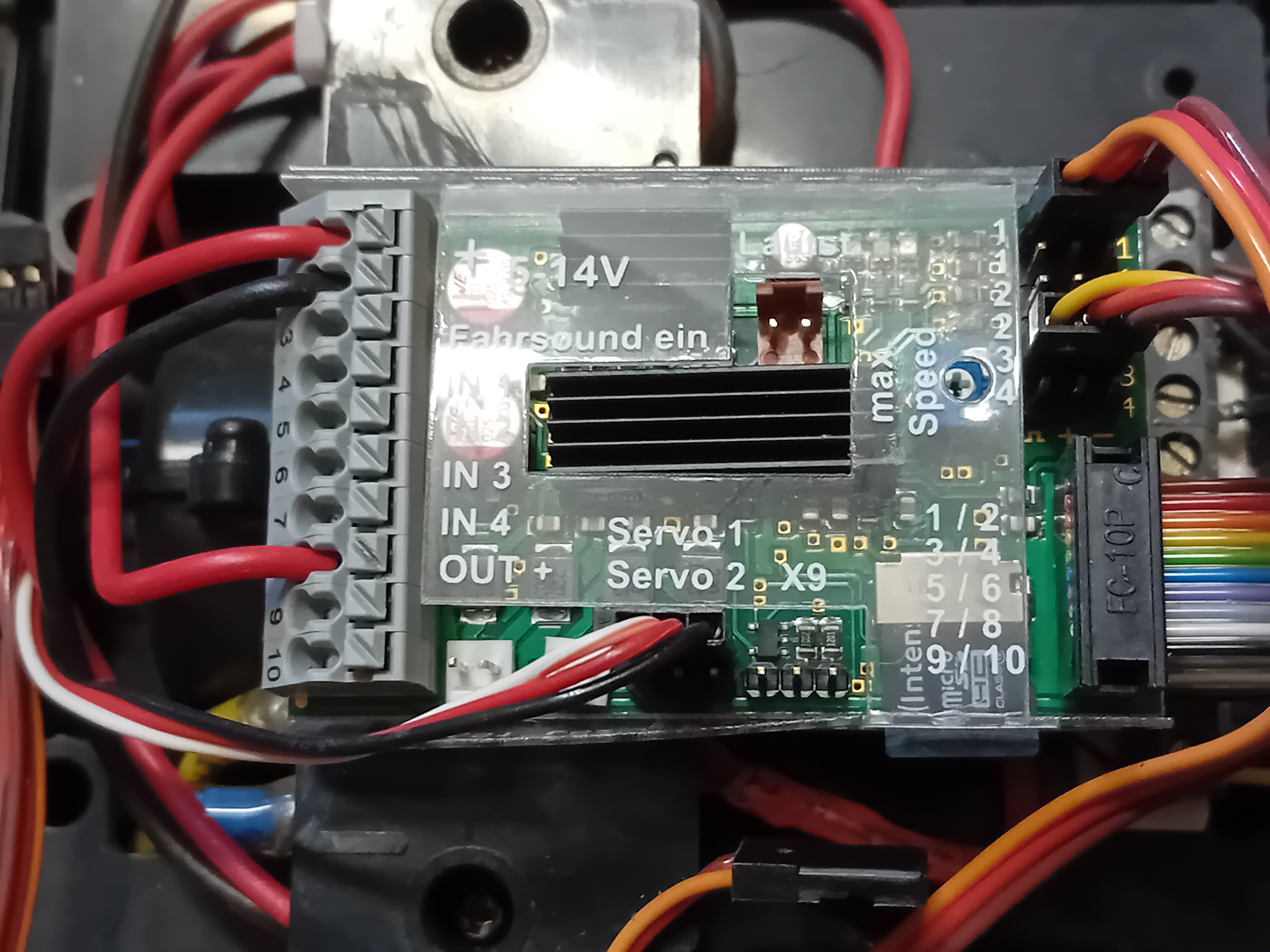
- 20260822_105320.jpg (4 MiB) 2924 mal betrachtet
Re: Wie kann ich ein Projekt von der SD-Karte auf meinen PC importieren?
Verfasst: Mo 31. Aug 2026, 18:36
von Cor
I did make some progress: after opening deUSM-RC-2 Sound-Teacher, I first clicked on tag "SD card" top left, second line, and selected the correct drive letter, then wet back to File and clicked on Import project from SD card", gave the new file a name and clicked "Store/save" and got another failure message: stating "this track on the C: drive is write protected...."
Re: Wie kann ich ein Projekt von der SD-Karte auf meinen PC importieren?
Verfasst: Mo 31. Aug 2026, 18:43
von Rascal
Cor hat geschrieben: ↑Mo 31. Aug 2026, 15:34Where do you see that this SD card is labelled SFR-1 ??
Sorry my mistake - I saw the screenshots on the left and didn't realize those were the ones embedded in the FAQ thread (which were taken from the SFR-1 Sound-Teacher).

I did make some progress: after opening deUSM-RC-2 Sound-Teacher, I first clicked on tag "SD card" top left, second line, and selected the correct drive letter, then wet back to File and clicked on Import project from SD card", gave the new file a name and clicked "Store/save" and got another failure message: stating "this track on the C: drive is write protected...."
That would be a Windows issue, i.e. you don't have permission to that particular folder. So before naming the file create a new folder e.g
C:\Users\USERNAME\Documents\Beier\Project1\ and then try to save the file to that folder.
Re: Wie kann ich ein Projekt von der SD-Karte auf meinen PC importieren?
Verfasst: Mo 31. Aug 2026, 19:28
von Cor
That worked! Had to create the subfolder "Beier" first, but then I got the sounds uploaded an to hear in my PC speaker. You 've made my day!
Thanks and I am continuing on my discovery trip. I'm afraid though that you will hear more from me

Cor
Re: Wie kann ich ein Projekt von der SD-Karte auf meinen PC importieren?
Verfasst: Mo 31. Aug 2026, 20:16
von Cor
Thanks for your willingness to look into this, but as it proved, this again was a matter of
user error, and Rascal got me on the right track: I had not properly identified the drive in which the SD card/file was residing; so no need to send you the file anymore.
Thanks again!
Cor