Seite 1 von 2
sequential indicators
Verfasst: Mo 4. Feb 2019, 14:11
von david pelling
Hello,
Is it possible to program 3 sequential indicators on each side on the rear of the truck and retain the normal front indicator/repeater?
If this is possible how would you program this function?
Dave
Re: sequential indicators
Verfasst: Mo 4. Feb 2019, 16:00
von Rascal
Hello,
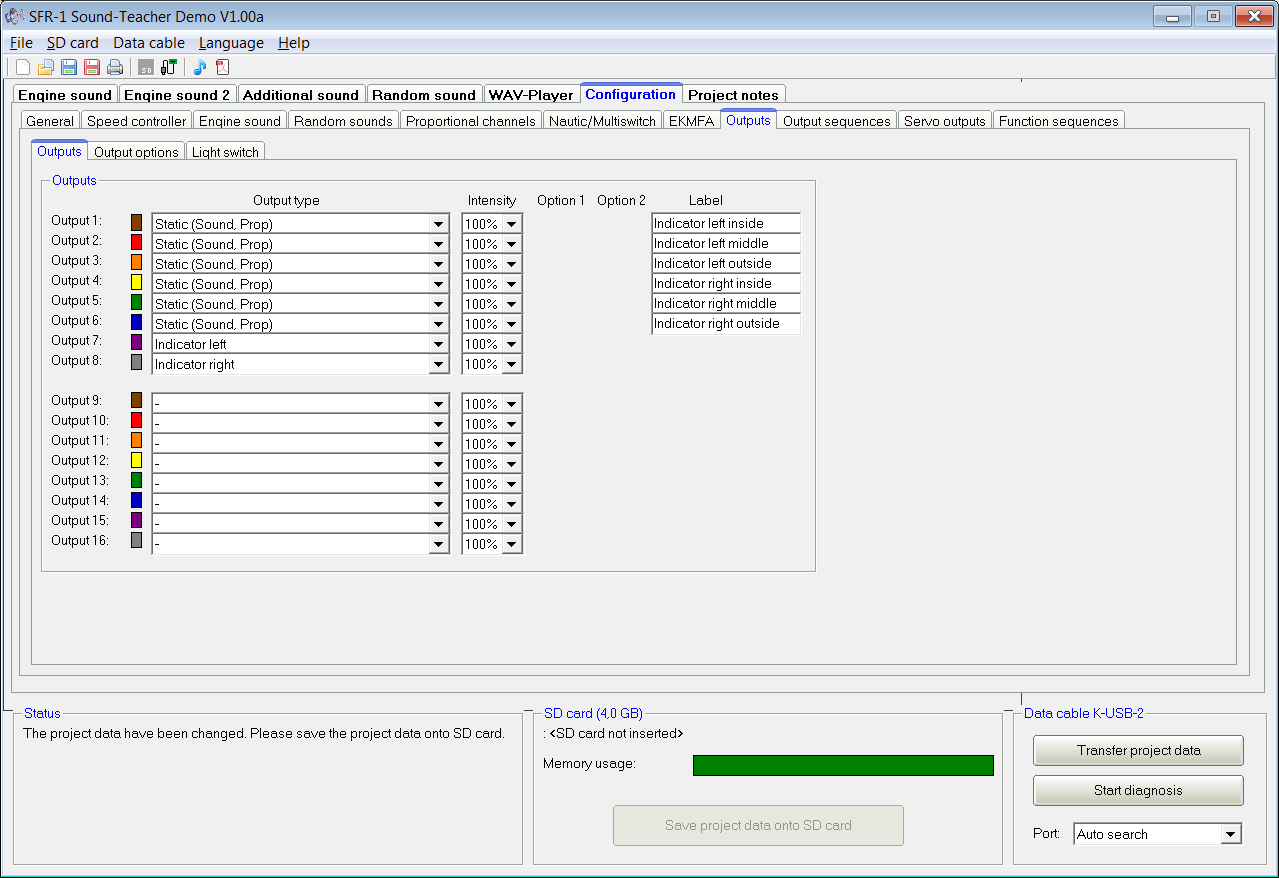
you would need 2 outputs for the normal indicators of type "Indicator left/right" and 6 outputs of type "Static (sound,prop)" for the rear.
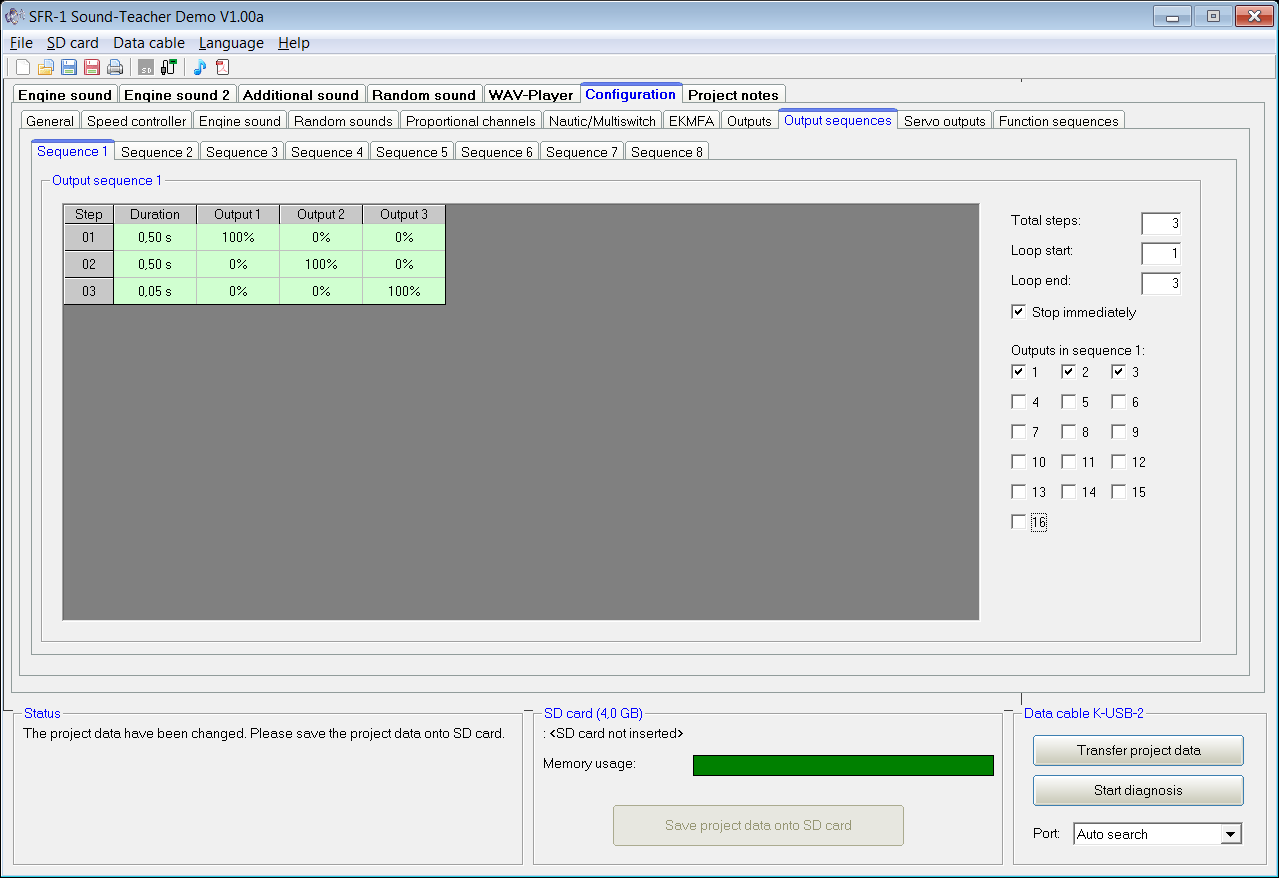
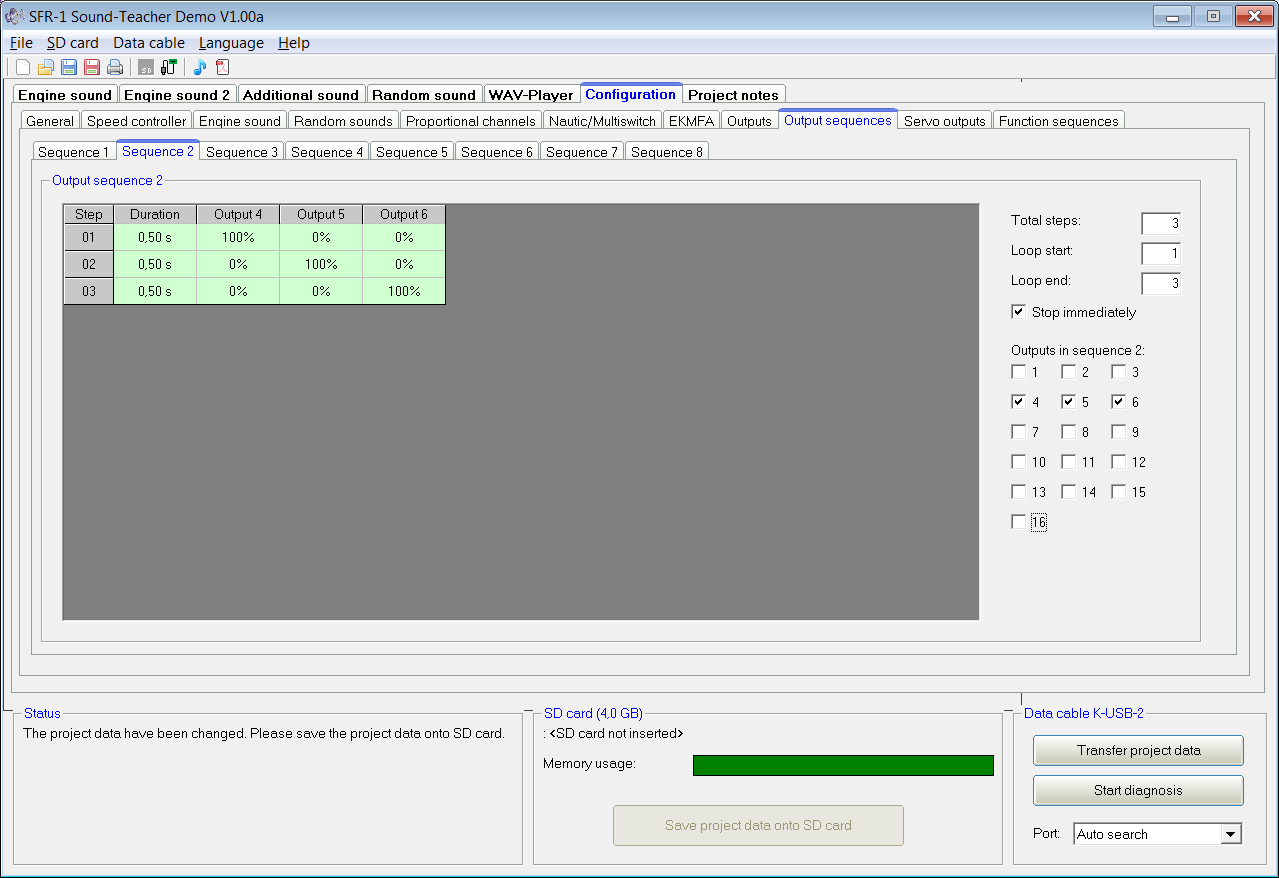
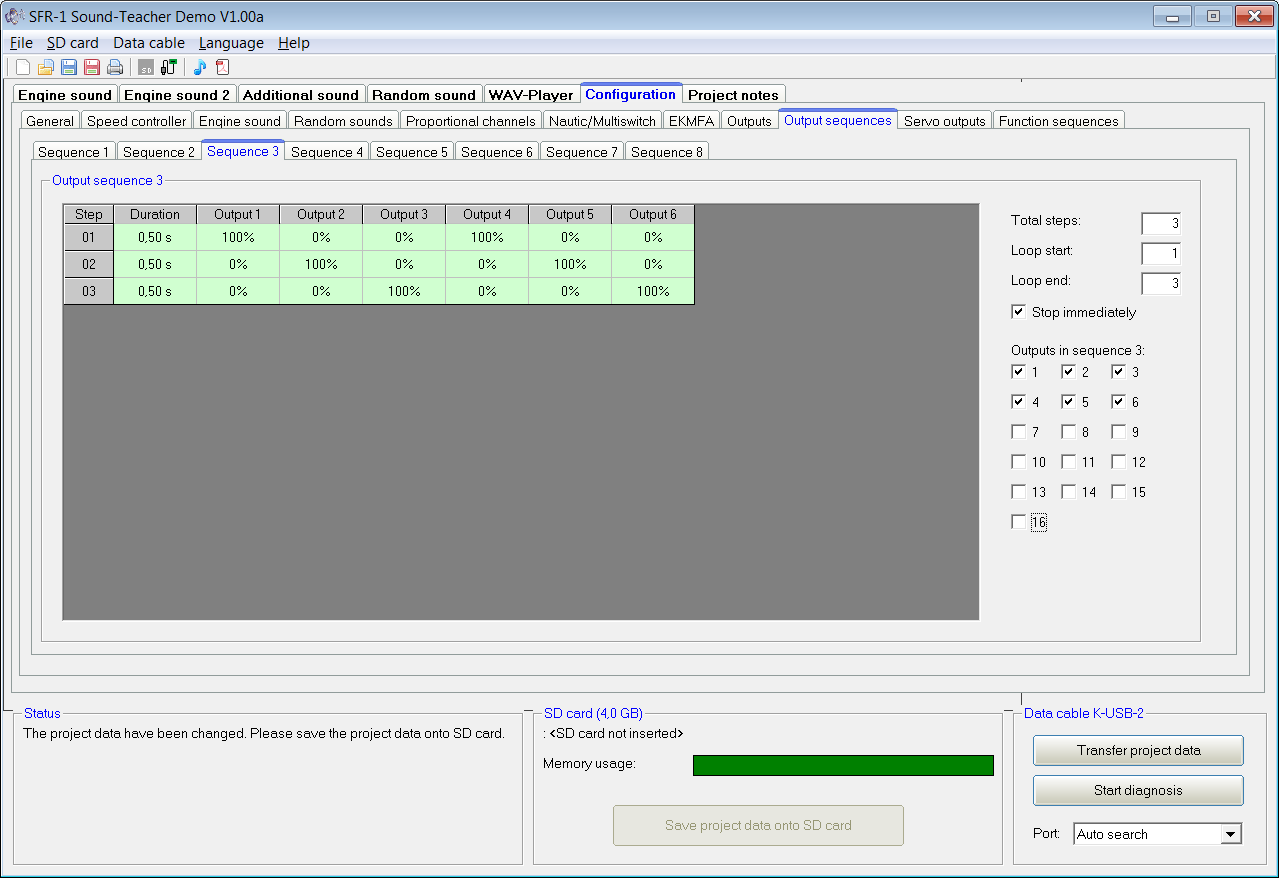
Then you program one output sequence for the left and one output sequence for the right rear indicators which include the 3 respective outputs. Add another sequence for the hazard lights with all 6 outputs. Select "Stop immediate" for each sequence.
(You can even program then sequences to interleave the lights on each side so that middle light goes on before the inner one goes off and the outer one goes on before the middle one goes off. And you can even dimm the lights during the transition phase if you wanted.)
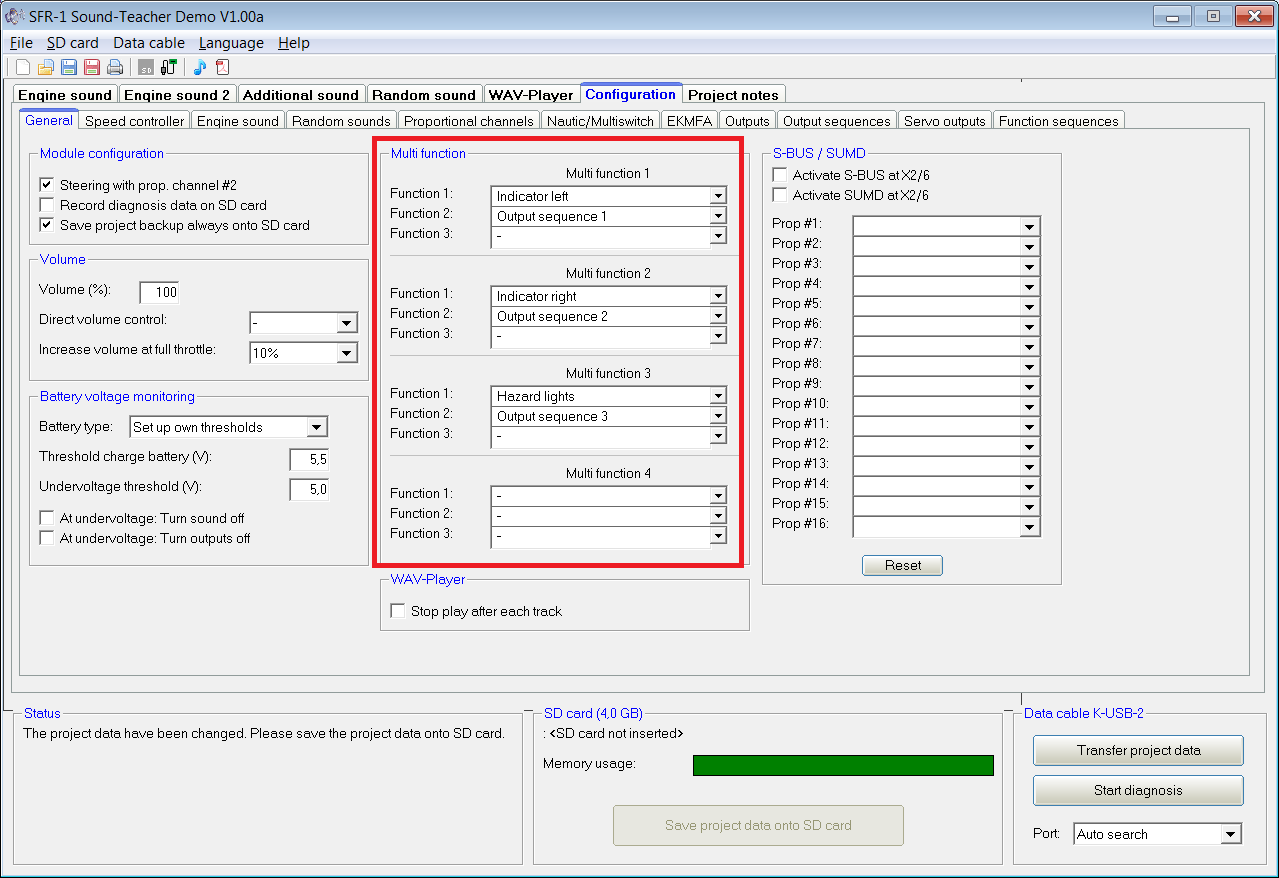
Switch on the normal indicator and the sequence 1 or 2 (left or right) using the Multi function 1 or 2, and the hazard lights together with sequence 3 using Multi function 3.
Alternatively you can program 3 Function Sequences, same principle but you won't need the Multi Functions to switch the indicators on/off. However programming a function sequence is a little bit more work and there is no dimming for the outputs.
Re: sequential indicators
Verfasst: Mo 4. Feb 2019, 18:33
von david pelling
Hi,
Thanks for that, i think i understand... the multifunction option activates up to 3 outputs ( for example left indicator, sequence 1) at once and there are 3 of them possible, is that correct?
Re: sequential indicators
Verfasst: Mo 4. Feb 2019, 18:34
von david pelling
Sorry forgot to mention i am using a carson 14 channel LCD pro with the Beier multiswitch module
Re: sequential indicators
Verfasst: Mo 4. Feb 2019, 19:36
von Rascal
Hi,
the
Output sequence controls the 3 outputs for each side to make the rear indicators sequential.
The
Multi function allows you to activate the ouput sequence together with the indicator function.
There are a maximum of 4 Multi functions of which you will need one for the left indicators, one for right indicators and one for the hazard lights.
See the following example:
- sfr00.png (52.41 KiB) 5335 mal betrachtet
- sfr01.png (41.8 KiB) 5335 mal betrachtet
- sfr02.png (42.02 KiB) 5335 mal betrachtet
Re: sequential indicators
Verfasst: Mo 4. Feb 2019, 19:37
von Rascal
- sfr03.png (43.41 KiB) 5335 mal betrachtet
- sfr04.png (56.28 KiB) 5335 mal betrachtet
Re: sequential indicators
Verfasst: Mo 4. Feb 2019, 20:05
von david pelling
Hello Rascal,
Thank you very much for taking the time to post such a detailed reply, i understand how to do it now !
Re: sequential indicators
Verfasst: Mo 4. Feb 2019, 22:18
von Rascal
You are welcome. Let us know if it works!

Re: sequential indicators
Verfasst: Mo 4. Feb 2019, 23:03
von david pelling
The SFR1 is not in the truck yet (not built it yet) but I’m going to set it up on a board to program and test the functions before it goes in.
I’ll post how I get on with it soon .....
Re: sequential indicators
Verfasst: Fr 8. Feb 2019, 12:38
von david pelling
Hi ,
I have done some testing and here's what i found,
The sequential indicators work when the sequence or the multi function is selected by using the nuatic multi switch, but i cannot get the sequential indicators working when i have the indicators linked to the turning on the steering channel,
Is there a way to get the indicators and sequential indicators to come on when you turn the steering?
Thanks