Seite 1 von 1
SFR1 loosing setting on restart
Verfasst: Sa 15. Dez 2018, 12:21
von david pelling
Hello, i have noticed that when i restart the SFR software on my laptop the the activate servo 1 in configuration becomes un ticked and the servo is not functioning correctly, i was thinking this maybe a bug or something i am doing wrong?
I can send the project if its needed.
David
Re: SFR1 loosing setting on restart
Verfasst: Mo 17. Dez 2018, 07:35
von BEIER-Electronic Andy
Hello David,
yes, please send me your project file.
Re: SFR1 loosing setting on restart
Verfasst: Fr 21. Dez 2018, 09:42
von BEIER-Electronic Andy
When I open your project, I get these settings:
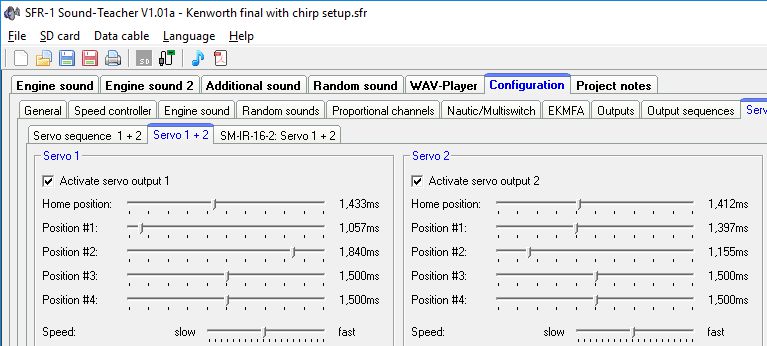
- SFR-1_Servo outputs.jpg (72.31 KiB) 4579 mal betrachtet
Is it different in your Sound-Teacher?
Re: SFR1 loosing setting on restart
Verfasst: So 23. Dez 2018, 10:34
von david pelling
Hello Andy,
Thanks for you quick reply, this is how it is in my sound teacher, but if i change something else in the project the next time i load the file to the SFR1 its has the active servo 1 tickbox unchecked.
i can correct this but i have to d this everytime i change something.
best regards
David
Re: SFR1 loosing setting on restart
Verfasst: Di 8. Jan 2019, 07:35
von BEIER-Electronic Andy
Ok, I've found the bug... Please download V1.01 via manual update again (or wait for the next update).
Re: SFR1 loosing setting on restart
Verfasst: Mi 9. Jan 2019, 10:21
von david pelling
Hello Andy,
Thanks for for that i'll give that a try and let you know what happens,
Re: SFR1 loosing setting on restart
Verfasst: Fr 11. Jan 2019, 11:48
von david pelling
Hello Andy,
I re-installed the V1.01 software via manual update and tested, i have found the same problem occurs.
I will wait for the next update and try again,or do you think it could be a corruption of data in my project?
Best regards
Dave
Re: SFR1 loosing setting on restart
Verfasst: Fr 11. Jan 2019, 12:57
von BEIER-Electronic Andy
Ooops... Windows does not update it, if the version number and the file size remain the same.
Now it should work after another manual update.